
Intelligent Search
Intelligent Search finds images and videos in a dataset from a text description. For example, try “school of fish” or “a couple skiing as the sun is setting.” Your assets don’t need tags or metadata first.
If your organization has Agentic Search turned on, the dataset search bar uses AI discovery by default. It picks visual or audio search from your query. See Agentic Search.
Search a dataset
-
Log in to Coactive.
-
On the Datasets tab, select the dataset you want to search.
-
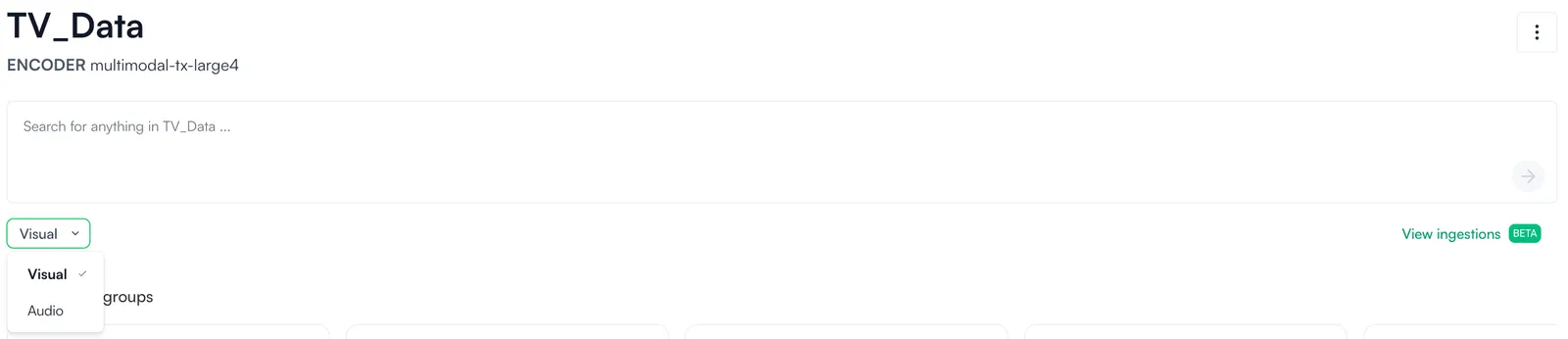
If the dataset holds videos, choose Visual or Audio in the dropdown under the search bar. Visual is selected by default.
-
Enter your query, then press Enter or select the arrow.
Search what’s on screen
Visual search matches what appears in your images and videos. Because the model interprets visual data, a short query can return a broad mix of results. For example, “home interior” might return home offices, kitchens, and living rooms. A more detailed query, such as “a man working on a couch in his home,” gives the model more context and returns closer matches.
Tips for visual queries
- Start broad, then narrow down. Begin with a short query and add details as you go:
- Basic: friendship
- Medium: friends enjoying a meal together
- Advanced: friends enjoying a meal together at night
- Review and refine. After each search, adjust the query based on what was or wasn’t found.
- Try synonyms. If “mature adult” doesn’t return what you want, try “elder” or “senior citizen.”
Search what’s said
Audio search looks through the audio track of your videos, the way you would search a transcript. Use it when the moment you want isn’t visually distinct, such as:
- A specific quote, like “I have a dream”
- A reported event or headline, like “Princess Diana killed in Paris car crash”
To search audio, select Audio in the dropdown under the search bar. Enter the quote or a description of what was said, then press Enter or select the arrow.