
Agentic Search
Agentic Search is a conversational way to find media in your Coactive workspace. Instead of writing precise filters, describe what you’re looking for in natural language. A large language model (LLM) interprets your intent and searches your image and video datasets for the most relevant results.
Agentic Search is turned on per organization. To turn it on for your organization, contact Coactive support.
What you can do
- Search across your image and video datasets in a single query
- Search spoken content in videos using transcripts (semantic or exact match)
- Steer results away from things you don’t want with negative search
- Use time-based context in your queries, such as a specific year
- Drill into a video to find the most relevant shots within it
Where to use Agentic Search
When you log in to Coactive, you land on Agentic Search, which searches your image and video datasets in parallel.
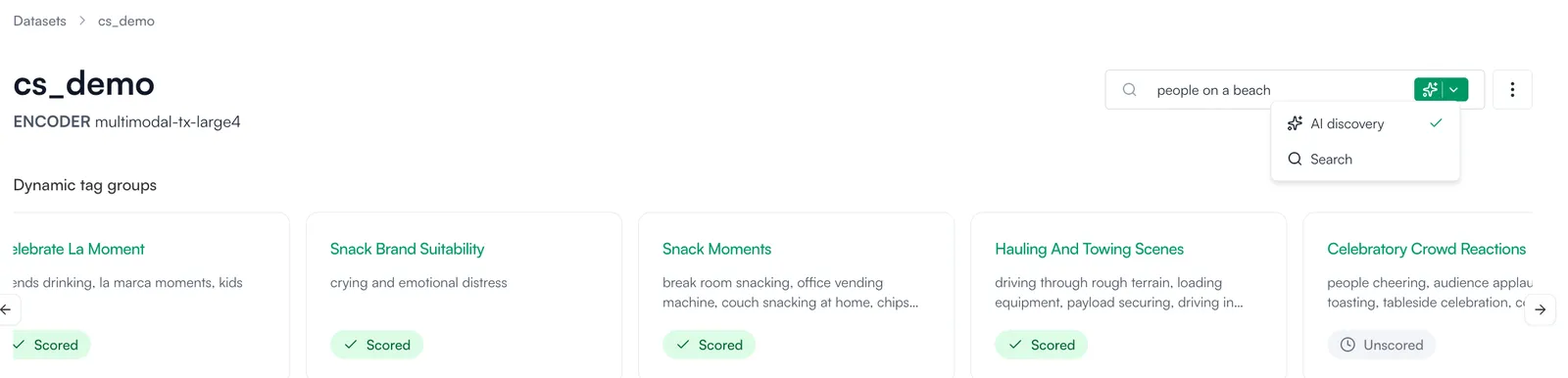
You can also use Agentic Search inside a specific dataset, where it searches only that dataset. In the dataset view, the menu on the right side of the search bar has AI discovery selected by default, which runs Agentic Search. To run a standard Intelligent Search instead, select Search.
With AI discovery, you don’t choose between visual and audio search. Agentic Search reads the cues in your query and searches what’s on screen or what’s said. For example, “videos where someone says ‘breaking news’” searches the transcript.
Search and refine in the conversation
- In the search box, describe the media you want, then select Search.
- Review the results. Coactive replies with a summary of what it found and shows the matching media on the Images and Videos tabs.
- To refine the results, select a suggested follow-up under the reply, such as Get more results, or type your own follow-up.
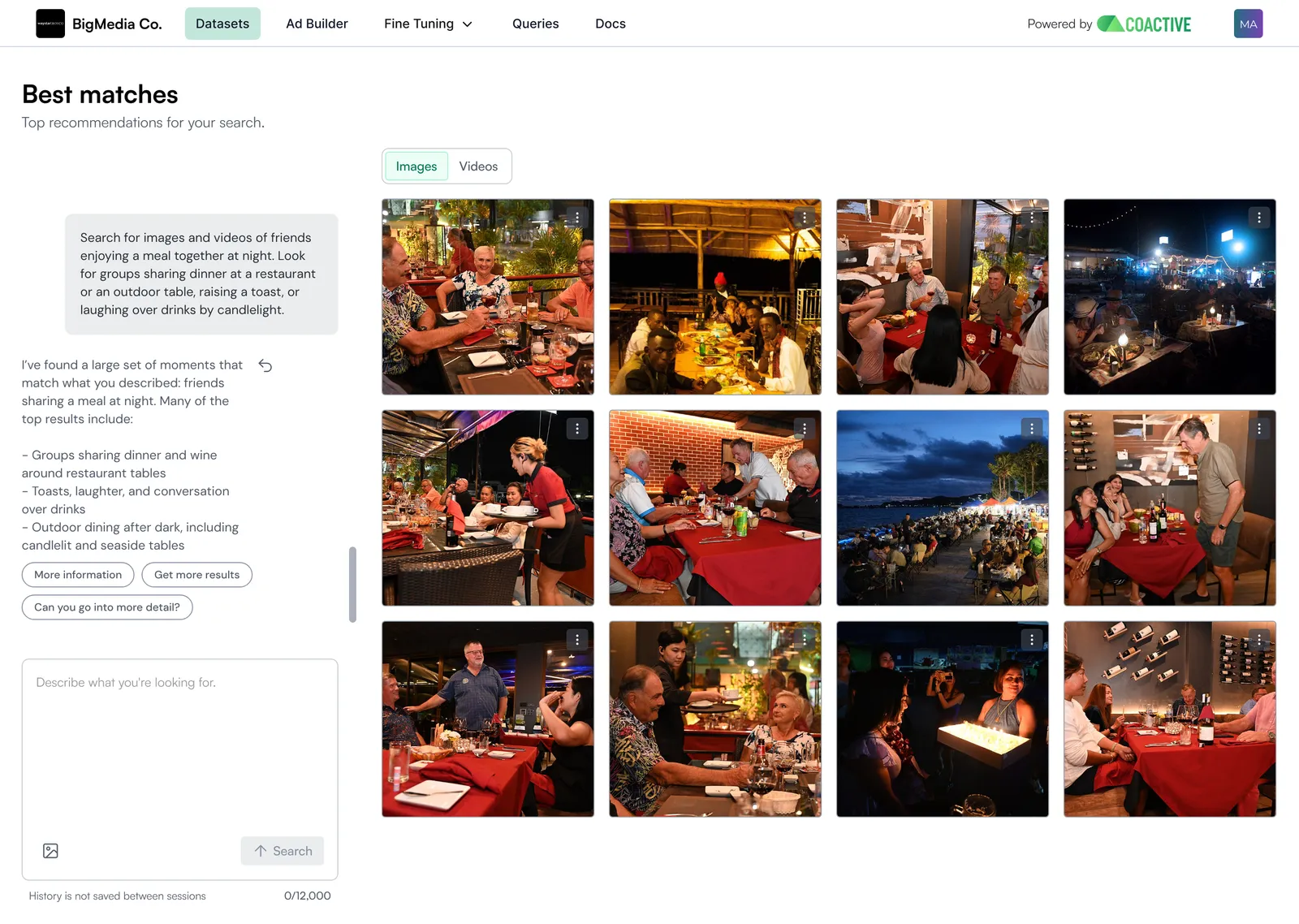
The conversation keeps your earlier context, so each follow-up builds on the previous search. History is not saved between sessions.
Core capabilities
Search across images and videos
When you search from the top-level view, your query runs against an image dataset and a video dataset together. Results come back on separate Images and Videos tabs. Agentic Search picks up modality cues in your query. If you say “show me images of…”, it favors images. If you don’t specify, it searches both.
Example queries:
- show me videos of a press conference at the white house
- protesters marching in Paris
- show me videos of trump meeting other world leaders
Transcript search
You can search the spoken content of your videos in two ways:
- Semantic transcript search finds moments where someone talks about a concept, even if they don’t use the exact words.
- Exact transcript match finds the precise word or phrase as spoken.
Example queries:
- videos where someone talks about interest rate hikes (semantic)
- videos where someone says “breaking news” (exact match)
Negative search
You can tell Agentic Search to steer away from something while keeping your main subject.
Example queries:
- show me videos of crowds but not sports crowds
- show me videos of aerial shots of cities, not at night
Negative search is a steer, not a hard filter, so an excluded item may still appear in the results. It works best when the thing you’re excluding is visually distinct, such as a color, an object, or a clear scene type.
Metadata-aware search (Beta)
Metadata-aware search is in beta and requires some setup. To enable it, contact Coactive support.
With metadata-aware search, Agentic Search uses your metadata without you writing filters.
Example queries:
- videos of US presidential candidates giving speeches at rallies in 2024
- images of wildfires in 2025
Works best with structured metadata fields, such as date and time fields like version_created. Extracting specific concepts from a paragraph-length field, such as “flood in Spain” in a long caption, is less reliable. It can also add latency, because the information is written in different ways. Metadata-aware queries in general may have higher latency.
Video drill-down
After a video search returns results, ask a follow-up to find the most relevant shots inside a specific video. You can also ask for similar moments in other videos.
Example queries:
- show me the most relevant shots in the top result
- find similar moments in other videos
Safety and moderation
The Agentic Search LLM includes built-in safety and moderation guardrails that may affect certain queries or responses. Some wording can trigger moderation even when the intent is benign. When this happens, you see a message such as “Unable to complete this request”. Rephrasing the query in more neutral or descriptive language often helps.
Tips for best results
Because an LLM reads your request for intent, you don’t need to start with a short query and build it up. Describe what you want the way you’d brief a colleague.
- Describe the whole scene. Say who or what is in it, what’s happening, and where. For example: “friends sharing dinner at an outdoor table at night, raising a toast.”
- Say which media you want. Start with “show me videos of…” or “show me images of…” if you have a preference.
- Describe what you’d see on screen. Visual details such as objects, actions, colors, and lighting help most.
- Include time references when relevant, such as “in 2025” or “from last December.”
- Refine with follow-ups. If the results aren’t quite right, tell Agentic Search what to change instead of starting over.
- Start a new chat for a new topic. Switching topics in the same conversation can slow down results.
Limitations
- Agentic Search supports English queries only.
- A single dataset holds either images or videos, not both. Searching across datasets still returns both.
- Negative search is a soft steer, not a hard exclusion.
- Metadata-aware ranking uses content timestamps. Concepts inside long caption or headline text aren’t reliably extracted yet.