
Recurring Packages
A recurring package turns a package from a one-time snapshot into a living targeting definition. Instead of exporting once and rebuilding whenever new content lands, you export once and Context Studio keeps scoring newly ingested content against your criteria for the life of the campaign — dropping each newly qualifying asset to your S3 automatically.
You choose whether a package is recurring at export time. Everything about how you build a package stays the same; recurring only changes what happens after you export.
Fixed vs. recurring
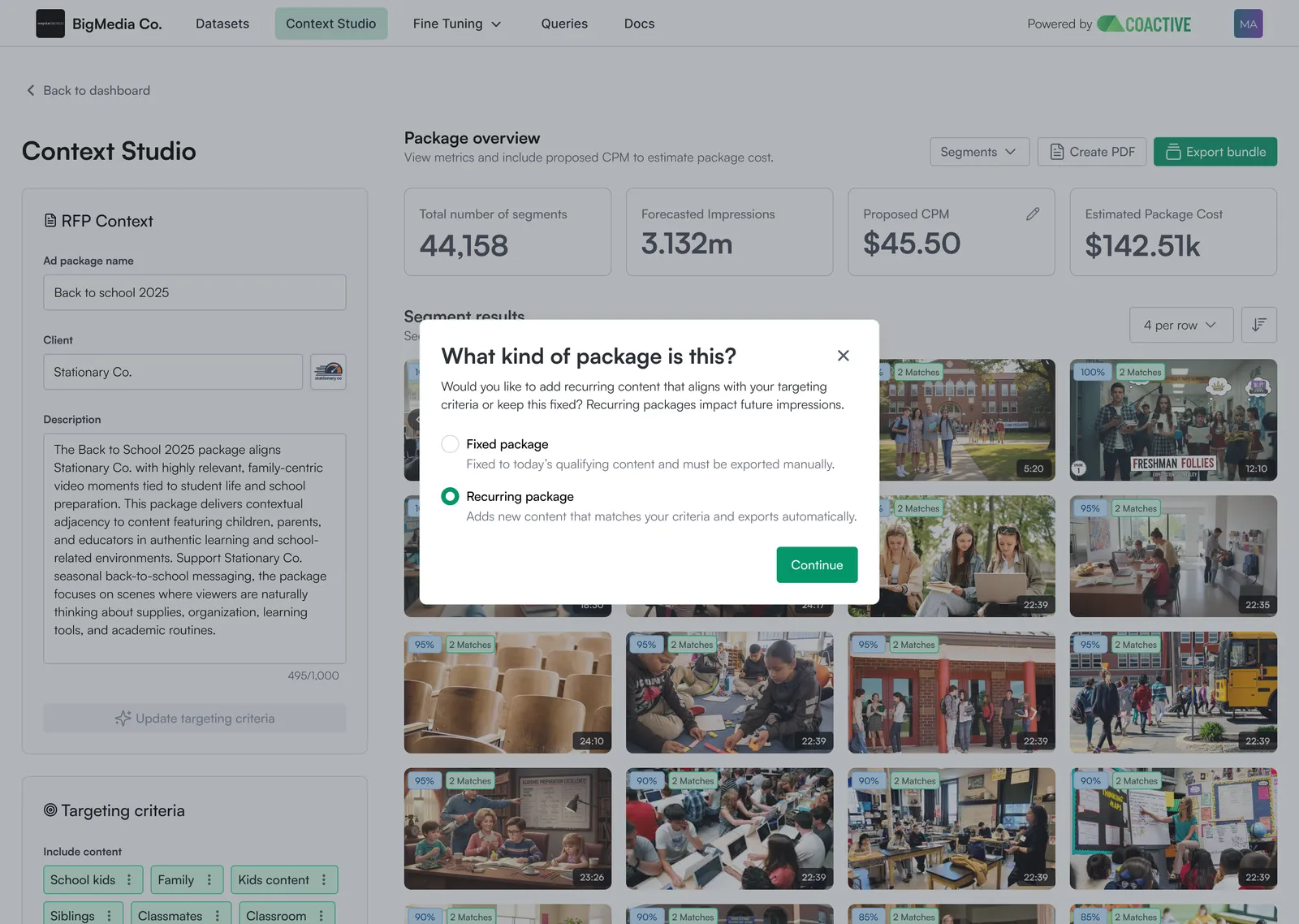
When you click Export Bundle, Context Studio asks “What kind of package is this?” Your choice determines how future content is handled.
Create a recurring package
-
Build your package as usual and confirm your results.
-
Click Export Bundle.
-
In “What kind of package is this?”, select Recurring package, then Continue.
-
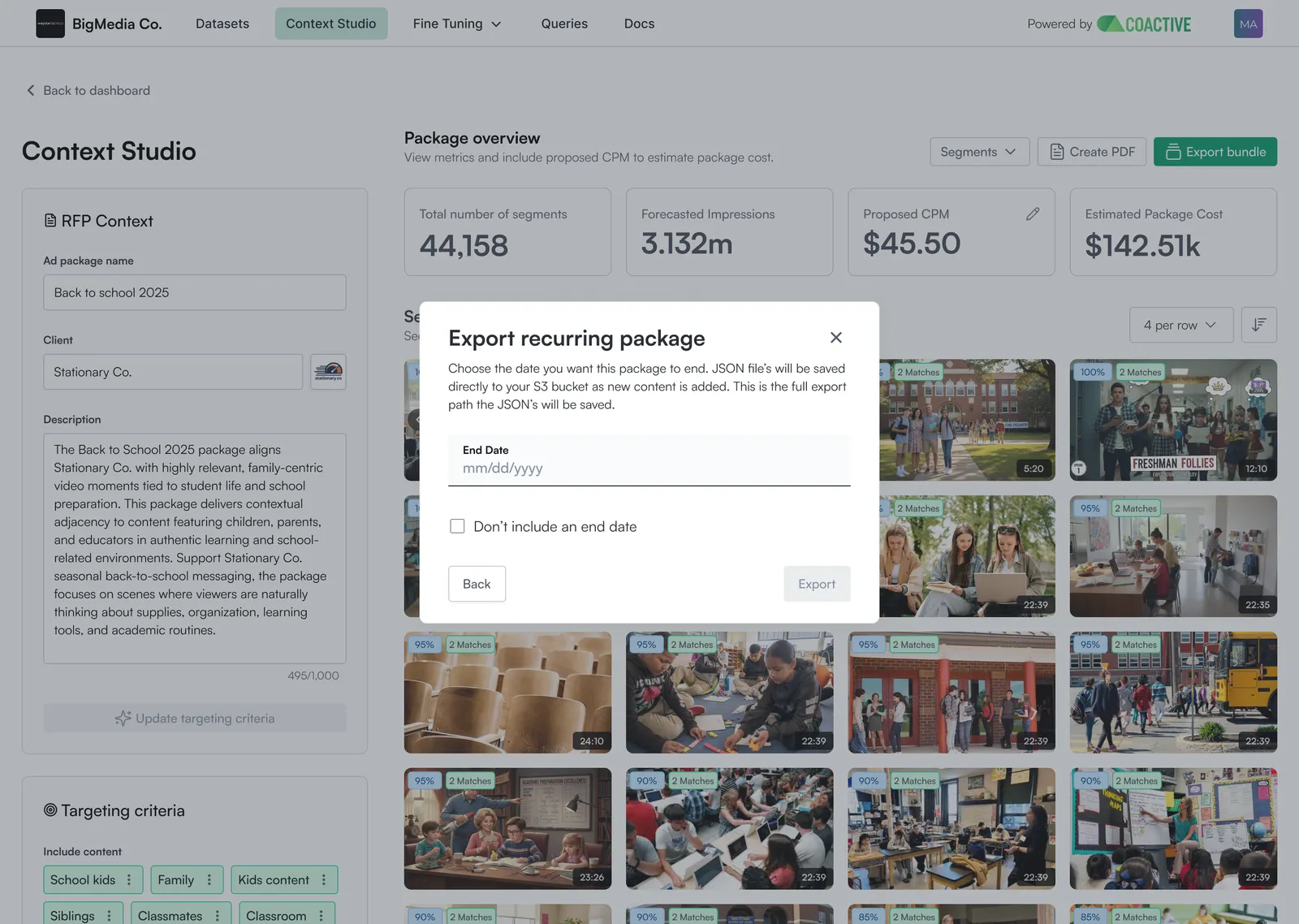
Set your recurring window:
- Enter an end date, or
- Check Don’t include an end date to keep the package evergreen (scoring continues until you end it).
-
Confirm the S3 export path shown, then Export.
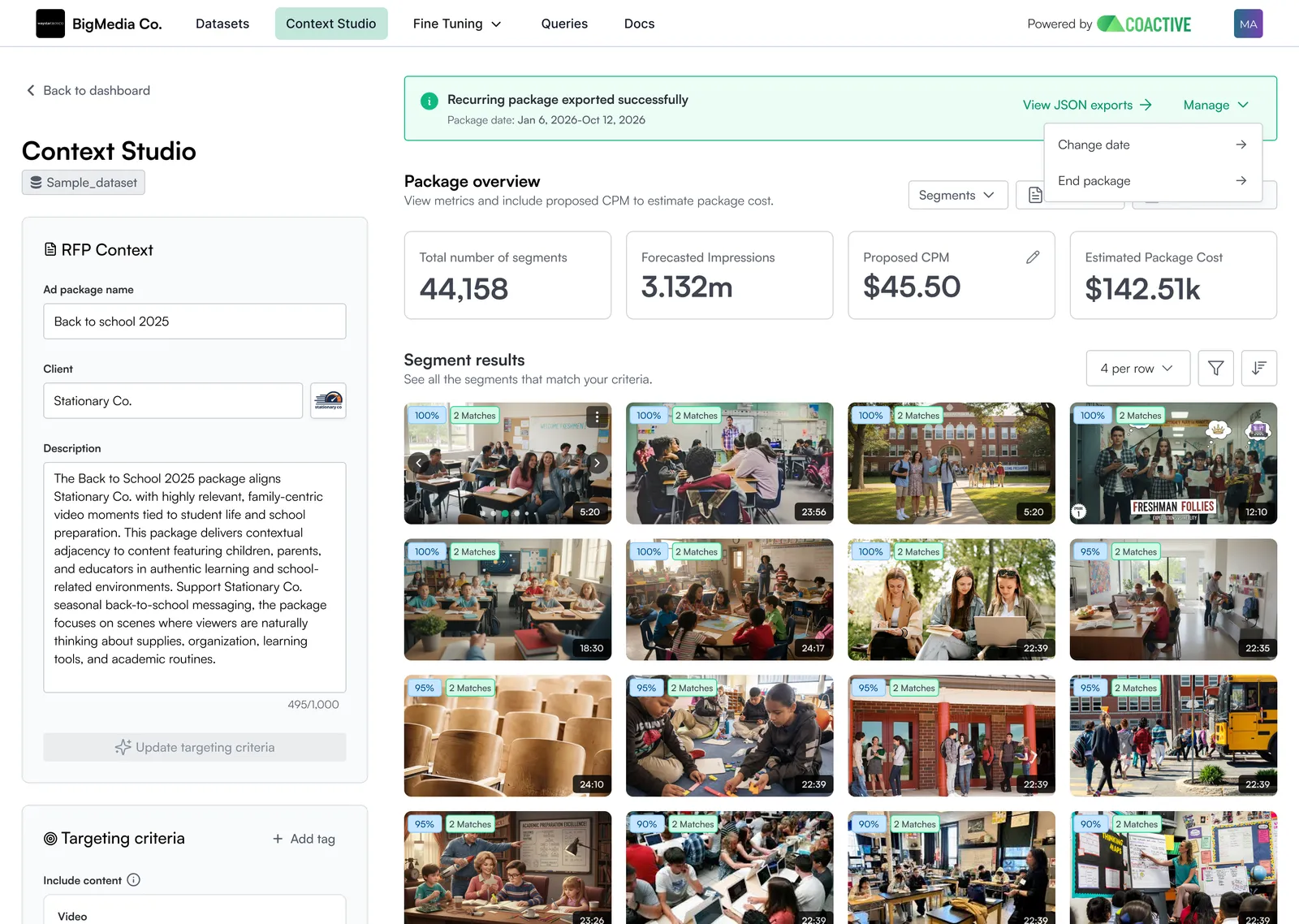
Your first JSON locks immediately as Export 1 and drops to your S3. From that point on, a scheduled job scores newly ingested matching content and drops a delta JSON on each run.
Setting a recurring package locks your first export, just like a fixed package. The locked JSON is a permanent record of what you exported at that moment and is never rewritten.
What happens on each run
Once a recurring package is live, this runs on a schedule with no manual trigger:
- New content is ingested and becomes eligible as its ad segments arrive.
- It’s scored against your package’s targeting criteria, using the latest validated version of your tags.
- Newly qualifying assets are written to a delta JSON — only the assets that are new since the last run.
- The delta drops to your S3, ready for downstream activation.
Each delta contains only newly qualifying content. Your earlier exports are never modified, so downstream systems keep exactly what they already received and simply gain the new assets.
Seeing new inventory
Open an active package any time to review what’s landed:
- A recurring indicator on the package row in the dashboard tells you at a glance which packages are recurring.
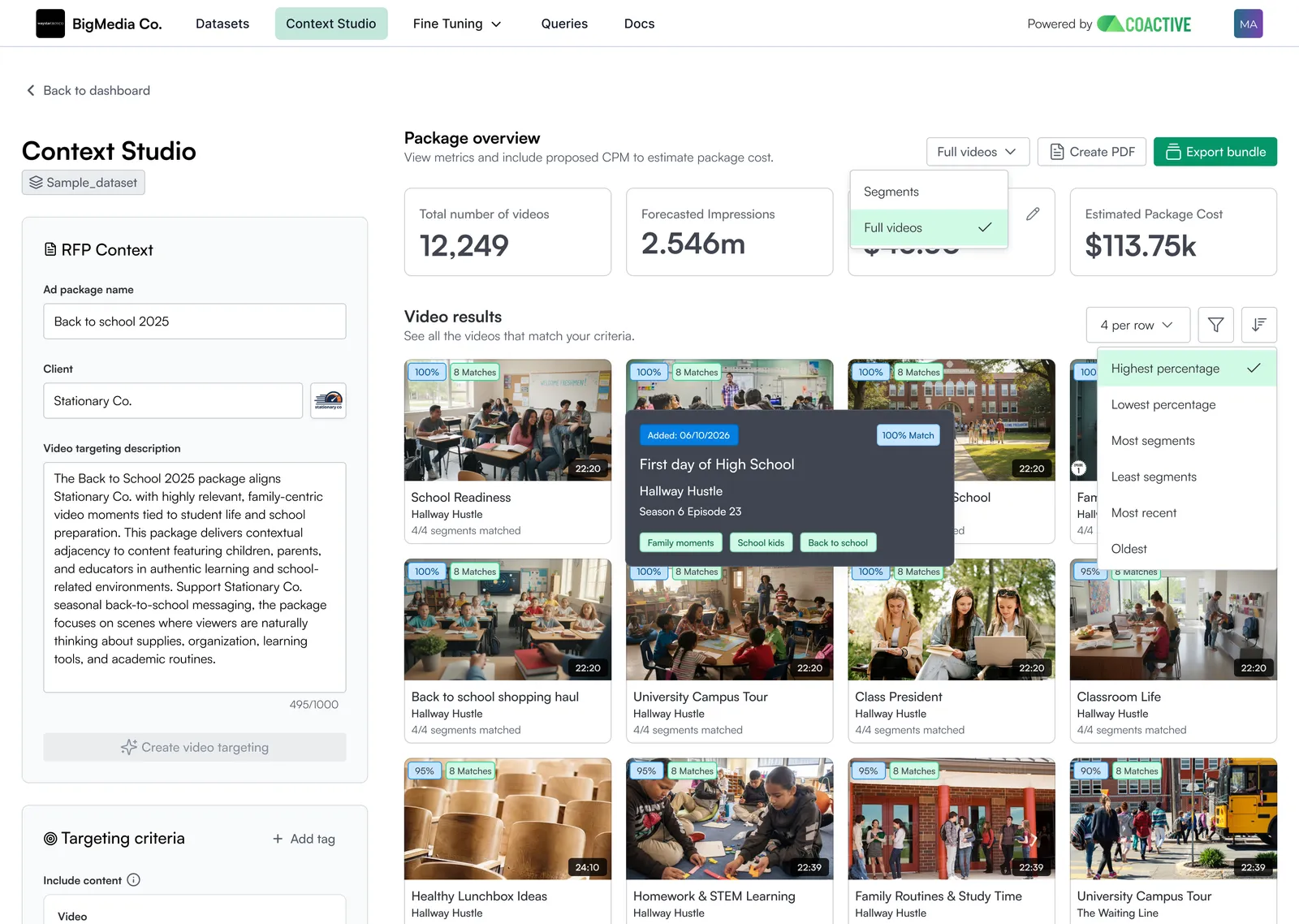
- Each qualifying video shows an Added: MM/DD/YYYY detail on hover, so you can see exactly what date your videos were added to a package.
- Sort by most recent or oldest to act on fresh inventory first.
- Videos show an X / X segments matched count, so you can sort by how much of a video fits your criteria.
- Note: This requires ad segments if the package includes segment level targeting. A video only shows a segment-match count once its ad segments have been submitted via the Ad Segment Metadata API.
JSON export history
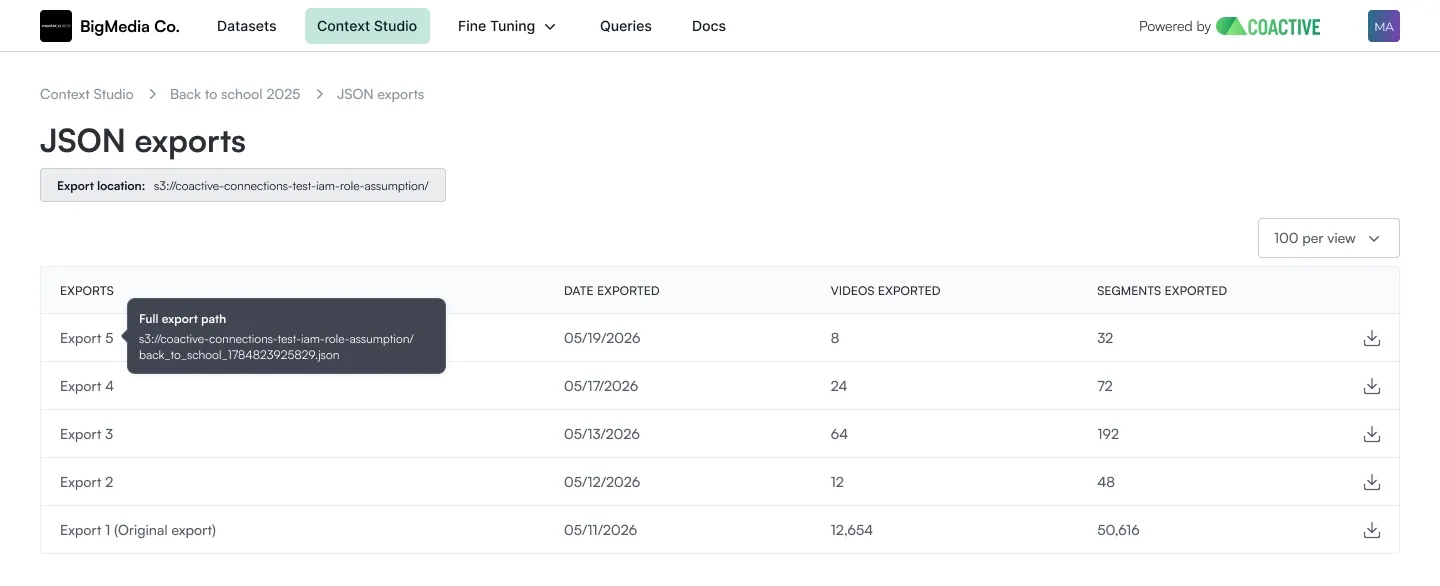
Every release for a recurring package is browsable under View JSON exports. You can reach it two ways: from the confirmation banner right after you export, or from the package on your dashboard once it’s been exported.
- The locked first export plus every delta, each stamped with its date and its video and segment counts.
- Historical releases are immutable — earlier drops always reflect exactly what was exported at the time.
- Download any JSON drop to answer “what ran against our brand, and when?” on the seller’s behalf.
Changing a live package
How you change a live package depends on what you’re changing.
Refining a tag’s definition
If you edit a Dynamic Tag used by the package — for example, adding a text prompt — re-score, publish, and validate the group. The scheduler automatically scores newly ingested content against the latest validated version on the next run. You don’t need to duplicate the package. Content already exported stays as it was; the change applies to future drops.
Broadening or changing targeting criteria
To change or broaden a recurring package’s targeting criteria — adding or removing tags to broaden or narrow the net — use Create a new version from the package’s ⋮ menu. This ends the current version immediately, since only one version is active at a time. See Package Versioning for the full flow.
If you want two versions running in parallel, use Duplicate instead: adjust the criteria on the copy, export the copy as recurring, and set an end date on the original.
Converting a fixed package to recurring
If you exported a package as Fixed and later want it to keep updating, duplicate the package and export the copied package as Recurring. The duplicate is initially created as a Draft status with a new package ID, so you must run it through the export flow and choose Recurring.
Good to know
- What makes an asset qualify. Once ingested, an asset is scored against your targeting criteria. Video-level targeting needs nothing more; segment-level targeting also needs ad segments (the cue points that define each scene). Assets missing required ad segments are skipped, then added automatically once ad segment data arrives — no action needed on your side.
- Segment integrity comes from the publisher. Context Studio trusts the ad segments provided and does not check for overlaps between them.
- Packages run on validated criteria only. A package always scores against validated dynamic tags and is tied to a single dataset within your organization, so every export and delta is built on approved logic.
- Deltas are additive. Each drop contains only newly qualifying assets; recurring packages produce deltas, not full re-exports.
- History stays immutable. JSON exports are never rewritten. When tags change and are revalidated, those changes flow into future drops — earlier drops are preserved exactly as delivered.
- Ending a package. Reaching the end date you set — or bringing that date forward via Manage package — stops all future scoring for the package.