Accepted Media Formats
The Coactive Ingestion API enables users to upload image and video assets for high-speed, scalable processing on the Coactive platform. Designed for performance at scale, it efficiently ingests large volumes of content across various formats, resolutions, and durations.
By automating video processing, intelligent keyframe selection, and indexing, Coactive transforms raw media into instantly searchable and organized assets, unlocking features like AI-powered search, dynamic tags, and advanced analytics. This document outlines accepted asset formats, resolutions, and CSV submission requirements.
Upload Methods
Users can upload assets to Coactive in the following ways:
- Cloud Storage – Provide an S3 file path to a single asset or millions of assets stored in an S3 bucket.
- List of Assets - Provide a list of up to 100 asset S3 paths, public or pre-signed URLs.
- Batch CSV/JSON Upload* – Submit 1 to 100,000 rows of assets via CSV or JSON file.
For bulk ingestions of more than 100 assets, using S3 URLs is recommended for efficiency. If using non-public URLs, please use our Connections API or contact us to help facilitate providing the proper credentials for a seamless ingestion process.
Supported Image Formats
.jpg is the preferred format and provides the fastest ingestion performance.The maximum supported image file size is 15 MB.
Image dimensions and aspect ratio
Images must meet the following requirements:
For example, an 8,000 × 8,000 image is within the 64-megapixel limit. A 16,000 × 4,000 image is also supported because it is 64 megapixels, does not exceed 16,000 pixels on its longest side, and has a 4:1 aspect ratio.
Supported Video Formats
Format
Video Codec
Audio Codec
- Recommended format: H.264 .mp4
- Minimum video length: 5 seconds
- Maximum supported video length: 5 hours
Accepted Resolutions & Frame Rates
Accepted Video Resolutions
Coactive processes videos in their original resolution without modifications. However, AI processing models work best at 360p.
- 240p
- 360p (Recommended for AI processing)
- 480p
- 720p
- 1080p
Frame Rate Guidelines
- Recommended FPS: 30fps
- Supported FPS: Up to 60fps (higher FPS will increase processing time)
CSV Submission Guidelines
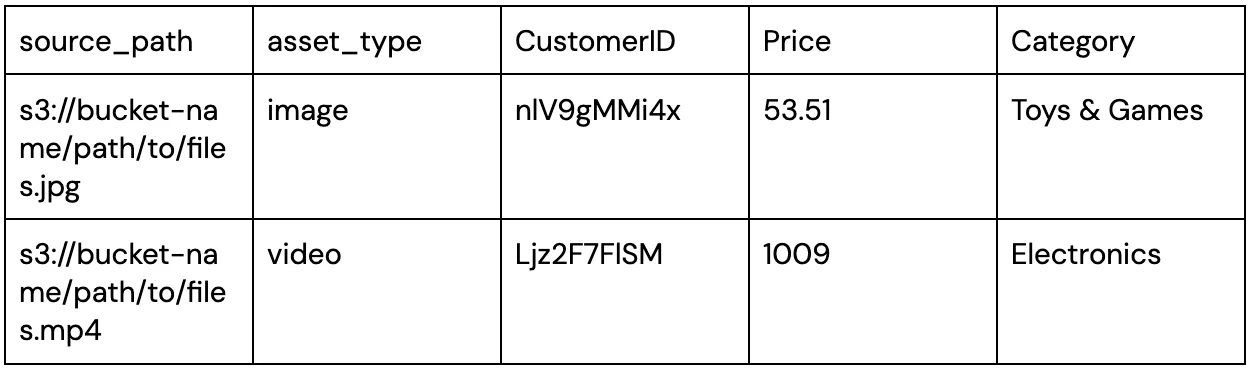
Coactive supports using CSV files with public URLs, allowing users to associate metadata with video and image assets.
File Submission Rules
- File Format: Must be a valid CSV (Comma-Separated Values) file.
- Encoding: UTF-8 is required.
- File Size Limits: 10mb
Header Line
The file must have exactly one header row with at least one column:
source_path: Required and is the path to the asset either s:// or http:// or https://asset_type: optional and if provided, it must be one of the following values:- unspecified
- image
- video
- Headers must follow these rules:
- No spaces – Use camelCase or snake_case (e.g., customerID, customer_id).
- Cannot contain special characters: , ; ( ) = \ \n \t
- Case-sensitive – Headers are preserved exactly as submitted. (e.g., CustomerID remains CustomerID).
Metadata
- All other columns are treated as string metadata.
- Column order does not matter.
Valid CSV Example